Presentation Template - Training: A Versatile Design Tool
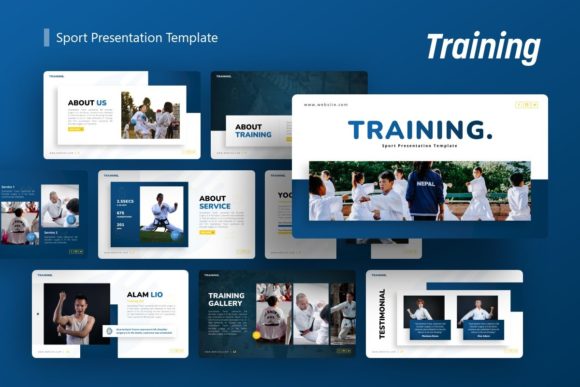
Effective communication in sports, corporate training, and creative pitching requires more than just spoken words; it demands a visual structure that guides the audience through complex information without causing cognitive overload. The Presentation Template - Training serves as this structural foundation, offering a comprehensive design system rather than a mere collection of decorative slides. While its name suggests a specific niche in athletic instruction or coaching, the underlying architecture makes it a powerful asset for creative agencies, startups, educators, and freelancers who need to convey dynamic movement, progress, and professional competence.
This template distinguishes itself through utility and flexibility. With 36 unique slides per variation, it provides enough breadth to construct a full narrative arc—from introduction and problem statement to detailed methodology and final call-to-action—without forcing users to repeat layouts. The inclusion of handcrafted infographics based on master slides ensures that data visualization remains consistent throughout the deck. For professionals aged 20 to 50 who manage their own branding, this balance of pre-designed structure and editable freedom is essential. It allows you to maintain high design standards while focusing your energy on content strategy and delivery rather than pixel-pushing alignment issues.
Beyond Athletics: Adapting the Visual Language
The aesthetic of sport inherently communicates energy, discipline, and improvement. These are universal themes that translate seamlessly into business and creative contexts. When utilizing the Presentation Template - Training for non-athletic purposes, consider how the visual metaphors of sport apply to your specific field.
For Creative Agencies and Portfolios, the bold typography and dynamic image placeholders typically used for action shots can be repurposed to showcase high-impact campaign results or architectural photography. The layout’s emphasis on movement directs the viewer’s eye across the slide, creating a sense of momentum that static grid layouts often lack. Instead of displaying a runner crossing a finish line, use the same compositional space to highlight a product launch timeline or a before-and-after case study. The template’s resizable graphics allow you to adjust the intensity of these visuals to match your brand identity, toning down the aggression for a minimalist portfolio or amplifying it for a pitch deck.
Corporate Trainers and Educators will find the infographic capabilities particularly valuable. Training materials often suffer from text density. By leveraging the handcrafted vector icons and chart systems included in the .PPTX file, you can transform dry compliance data or onboarding procedures into digestible visual flows. The master slide functionality means that if you update your company color palette or logo placement once, it propagates instantly across all 36 slides. This efficiency is critical for internal communications teams who must produce updated training decks quarterly or monthly.
Strategic Applications for Entrepreneurs and Startups
Startups and small business owners often operate with limited resources, making the dual-purpose nature of this template a strategic advantage. A pitch deck needs to tell a compelling story of growth, while a company profile needs to establish trust and capability. The Presentation Template - Training supports both narratives through its varied slide types.
- Pitch Decks: Use the "Team" and "Stats" slides to demonstrate organizational strength. The sport-inspired layouts naturally frame team members as active contributors rather than passive headshots, suggesting a culture of collaboration and drive.
- Company Profiles: Utilize the timeline and milestone slides to map out business history. The clean lines and organized spacing help present chaotic startup growth as a calculated, disciplined trajectory.
- Client Proposals: Adapt the strategy slides to outline project phases. The visual hierarchy established in the master slides helps clients understand deliverables and expectations clearly, reducing friction during the sales process.
When adapting this template for business proposals, focus on clarity over decoration. The drag-and-drop picture placeholders are designed for speed, but ensure the images you select reinforce your message. If you are proposing a marketing strategy, avoid generic stock photos of people shaking hands. Instead, use the template’s framing to highlight screenshots of analytics, user interfaces, or tangible work samples. The template provides the container; your authenticity provides the value.
Maximizing Customization Without Breaking Consistency
One of the most common pitfalls when using pre-made templates is over-customization, which leads to a disjointed final product. To keep your presentation professional and audience-friendly, adhere to the design logic embedded in the Presentation Template - Training. The documentation file included with the download is not an afterthought; it is a guide to maintaining visual integrity.
Begin by setting up your master slides correctly before editing individual pages. Define your color codes, font pairings, and logo placement globally. This ensures that even as you resize graphics or swap out vector icons, the deck retains a cohesive look. When working with the handcrafted infographics, resist the urge to alter the fundamental proportions unless necessary. These elements were designed with specific ratios to ensure readability at various projection sizes. If you need to change the data, edit the values and labels rather than stretching the shapes manually.
For freelancers and personal portfolios, consistency builds recognition. Create a custom theme within PowerPoint based on this template so that future presentations automatically inherit your stylistic choices. This turns a one-time purchase into a long-term branding asset. Remember that while the demo images provide inspiration, they are not included in the files. This is actually a benefit, as it forces you to source or create imagery that is genuinely relevant to your content rather than relying on placeholder aesthetics that may not align with your actual work.
Practical Inspiration for Diverse Formats
The versatility of this template extends beyond the screen. Because all graphics are vector-based and resizable, the assets can be exported for use in other mediums. A slide designed for a training workshop can be exported as a high-resolution PDF handout, or individual infographic elements can be saved as PNGs for social media teasers leading up to an event.
Consider these practical variations for different user goals:
- The Workshop Facilitator: Combine the "Agenda," "Key Takeaways," and "Q&A" slides to create a structured learning environment. Use the ample white space in the text-heavy slides to add speaker notes or interactive prompts, turning a passive presentation into an active workbook.
- The Fitness Professional: Lean into the original intent. Use the motion-focused layouts to break down exercise form or nutrition plans. The ability to overlay text on darkened image backgrounds ensures legibility even when using vibrant photography.
- The Non-Profit Organizer: Adapt the "Impact" and "Volunteer" slides to showcase community initiatives. The energetic tone of the template helps combat donor fatigue by presenting challenges as opportunities for action rather than insurmountable problems.
Ensuring Content Effectiveness and Accessibility
A beautiful template cannot save poor content. As you build your deck using the Presentation Template - Training, prioritize information architecture. The 36-slide count is a maximum, not a requirement. Select only the layouts that serve your narrative. If a slide does not advance your argument or clarify a concept, remove it. Audiences appreciate brevity and respect for their time.
Pay attention to contrast and readability. While the template offers pixel-perfect illustrations, ensure that your text remains accessible against background colors. Test your slides on different screens before presenting. What looks crisp on a retina display may lose definition on a standard office projector. The master slide system allows you to adjust global brightness or contrast settings quickly if testing reveals visibility issues.
Finally, remember that this tool is designed to support your expertise, not replace it. Whether you are a photographer showcasing a new series, a startup founder seeking seed funding, or a coach introducing a new training regimen, the Presentation Template - Training provides the professional polish needed to make your ideas land. By combining its robust technical features with your unique insights and authentic voice, you create a presentation that is not only visually engaging but genuinely useful to your audience. The goal is always connection and understanding; the design simply clears the path for that exchange to happen effectively.