Presentation Template - Delegate: Design Guide
Creating a pitch deck or corporate profile often feels like a battle between content and design. You have the data and the narrative, but translating that into a visually compelling slide deck can consume hours of productive time. The Presentation Template - Delegate addresses this specific friction point by offering a structured yet flexible framework for visual storytelling. Unlike generic templates that force your content into rigid boxes, Delegate is engineered with a modular approach that respects both the information architecture and the aesthetic requirements of modern business communication.
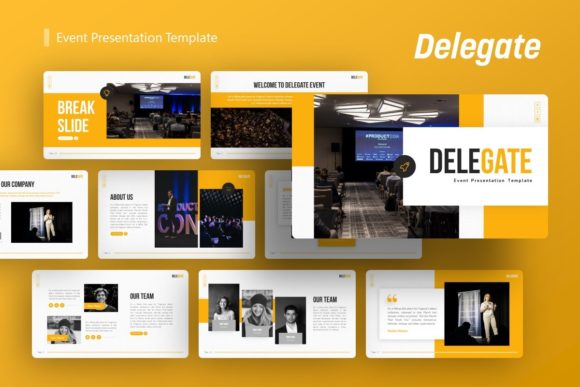
Visually, this template strikes a balance between corporate professionalism and creative agency flair. It avoids the sterile look of default office software while steering clear of overly decorative elements that distract from the message. The personality of the deck is confident and organized, utilizing clean lines, ample whitespace, and strategic color blocking to guide the viewer’s eye. For entrepreneurs and marketers, this visual tone establishes immediate credibility. It signals that the presenter values clarity and precision, traits that are essential when seeking investment, showcasing a portfolio, or outlining a quarterly strategy.
Versatility Across Creative and Corporate Projects
One of the strongest attributes of the Presentation Template - Delegate is its adaptability across different verticals. While many templates are niche-specific, this asset functions effectively as a chameleon. For a creative agency, the layout supports high-impact imagery and minimal text, allowing case studies to breathe. The picture placeholders are designed with aspect ratios that flatter photography and digital art, making it ideal for portfolios where visual work must take center stage without competing against heavy graphical backgrounds.
Conversely, for startups and corporate entities, the template excels in data visualization. The inclusion of handcrafted infographics transforms dry statistics into digestible visual narratives. This is crucial for pitch decks where investors need to grasp market size, growth projections, and user demographics quickly. The infographic slides are not merely static images; they are built on master slides within PowerPoint, meaning you can edit data points directly rather than recreating charts from scratch. This feature alone saves significant time during the iterative drafting process of a fundraising round.
For personal brands and bloggers, the template offers a cohesive way to present media kits or speaking proposals. The consistency in typography and layout helps reinforce brand identity, ensuring that every slide feels like an extension of your website or social media presence. Because the graphics are fully resizable and editable vector elements, you can adjust the scale to fit various screen sizes or even repurpose individual slides as social media graphics or PDF lead magnets, extending the value of the design assets beyond the presentation itself.
Enhancing Readability and Visual Hierarchy
Effective presentation design is less about decoration and more about cognitive load management. The Presentation Template - Delegate utilizes established principles of modern typography and layout to enhance readability. The text hierarchy is clearly defined through font weight, size, and color contrast, ensuring that headlines, subheads, and body copy are instantly distinguishable. This is vital for audience engagement, as viewers should never have to struggle to identify the main takeaway of a slide.
The template’s use of whitespace is particularly noteworthy. In editorial design and web design, negative space is an active element that prevents visual fatigue. Delegate applies this same principle to slides, resisting the urge to fill every corner with content. This restraint improves comprehension and retention. When presenting complex topics like financial models or technical workflows, the breathing room around key elements allows the audience to process information sequentially rather than being overwhelmed by a wall of text.
Furthermore, the pixel-perfect illustrations included in the deck serve a functional purpose beyond aesthetics. They act as visual anchors that break up monotony and provide context. Whether used as section dividers or conceptual metaphors, these graphics maintain a consistent stroke weight and style, which contributes to a polished, professional perception. Consistency in visual language builds trust; when a deck looks disjointed, audiences subconsciously question the reliability of the information presented. Delegate mitigates this risk through its unified design system.
Practical Implementation and Customization Workflow
Adopting a new template requires understanding its underlying structure to maximize efficiency. The Presentation Template - Delegate includes 36 unique slides per variation, providing a comprehensive library of layouts. However, the real power lies in the Master Slides. Before adding content, spend ten minutes reviewing the Slide Master view. This is where global changes to fonts, colors, and logo placement occur. Updating the master ensures that your brand identity remains consistent across all 36 slides without manual formatting.
When evaluating project fit, consider your content volume. If you are building a photo-heavy portfolio, prioritize the image-centric layouts. If you are delivering a data-driven report, test the infographic slides with your actual datasets first to ensure they accommodate your specific metrics. The drag-and-drop picture placeholders streamline this testing phase, allowing you to visualize the final output rapidly. Remember that while the demo images showcase potential, they are preview-only; you will need to source your own high-resolution photography to match the template’s premium feel.
Typography pairing is another practical consideration. While Delegate comes with pre-selected fonts that work harmoniously, you may need to adjust them to match existing brand guidelines. Stick to proven pairings: a strong sans serif for headers paired with a highly legible serif or neutral sans for body text maintains the template’s intended readability. Avoid using more than two typefaces unless there is a distinct functional reason. The goal is to let the content shine, not to showcase typographic variety.
Licensing, Assets, and Professional Standards
Understanding what is included in the file package prevents workflow interruptions. The download typically contains the .PPTX file, documentation, and vector icon sets. The documentation is an underutilized resource; it often contains shortcuts, color codes, and tips specific to the Delegate ecosystem. Reviewing this before starting can prevent common formatting errors. The vector icons are particularly valuable for customizing infographics or adding visual cues to bullet points without resorting to low-quality clip art.
From a commercial standpoint, always verify the licensing terms if you plan to use the template for client work or resale. Most standard licenses cover personal and internal business use, but client deliverables may require extended permissions. Additionally, because the template relies on system compatibility, ensure your version of PowerPoint supports the advanced features used in the master slides. While the design is robust, older software versions may render certain effects differently.
Ultimately, the Presentation Template - Delegate serves as a foundational tool for professionals who understand that design facilitates communication. It removes the barrier of starting from a blank canvas while providing enough flexibility to avoid looking templated. By leveraging its master slide architecture, respecting its visual hierarchy, and integrating your unique content thoughtfully, you transform a collection of slides into a persuasive, professional narrative. Whether for a startup pitch, a creative portfolio, or a corporate update, the template provides the structural integrity needed to let your ideas resonate with clarity and impact.